
Dashlane Password Manager
DashlaneProductivity
4.520.05K Reviews
- Version
- 6.2634.0
- Installs
- 5.00M
- Age Rating
- Everyone
Screenshots
Our Review of Dashlane Password Manager
 Analysis by Appyee
Have you ever found yourself struggling to remember all your passwords, or worse, using the same one for everything? I know I have. Enter Dashlane Password Manager, a lifesaver for those of us juggling multiple accounts across the web. Let me take you on a tour of this app that promises to simplify our digital lives.
When I try a password manager, the first week is usually the easy part: the convenience is obvious, and every saved login feels like one less thing to remember. The real test comes later, when I have to decide whether the app still fits the way I sign in, shop, and move between devices. Dashlane is a productivity app from Dashlane, and its appeal rests on making a security habit feel less like a chore.
The first week: turning saved logins into a habit
Setting up Dashlane is a breeze. After downloading it from the App Store or Google Play, you’ll be prompted to create a master password. This is the only password you’ll need to remember, so make it strong and secure! Once you’re set up, you can start adding your passwords.
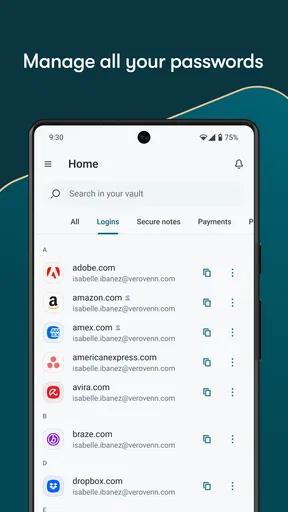
I was pleasantly surprised by how user-friendly the interface is. The dashboard is clean, with a clear layout that makes navigation intuitive. Adding new passwords is straightforward; you can do it manually or let Dashlane do the heavy lifting by importing them from your browser.
My practical advice is to start with the accounts you use most, rather than trying to tidy your entire digital life in one sitting. Save your email, banking, shopping, and work logins first, then let the app become part of those routines. If you have old accounts you rarely use, there is little benefit in turning setup into a big cleanup project before you have even decided whether the workflow suits you.
A realistic first-week test is ordering something from your phone, then signing in to the same retailer later on a computer. A password manager earns its place when the login is ready at the moment you need it, not merely because a vault looks organized. Dashlane’s appeal is strongest for people who routinely move between devices and have enough accounts that memory and repeated passwords have become a nuisance.
Getting Started with Dashlane
One question people often have is whether they need to replace every saved password immediately. I would not treat that as a requirement. I find it more manageable to save credentials as I use them, then improve weak or reused passwords when there is a clear reason to revisit an account. That approach makes the new habit less disruptive and helps avoid a rushed migration.
Features That Stand Out
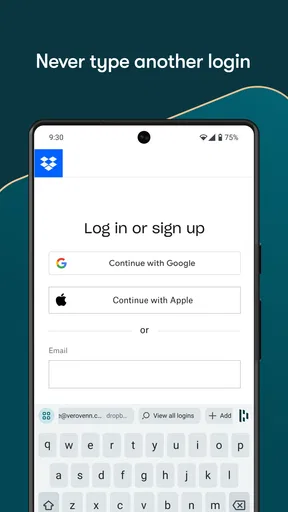
One of my favorite features is the auto-fill function. Whether you’re logging into your email or shopping online, Dashlane seamlessly fills in your credentials, saving you time and hassle. It even works across different devices, which is a huge plus if you’re like me and switch between your phone and laptop constantly.
Another nifty feature is the Password Generator. We all know how important it is to have strong, unique passwords, yet coming up with them can be a pain. Dashlane’s generator creates robust passwords for you, and you can customize the length and complexity. No more "password123" for us!
There is a useful trade-off here: a generated password is only helpful if it is saved with the right account and can be retrieved when you need it. When I create a new login, I try to do both steps together instead of generating a password separately and trusting myself to copy it correctly later. That small routine prevents the awkward situation of having a strong password but no reliable way to find it.
Auto-fill also depends on letting the app become part of your normal sign-in flow. If you keep switching between Dashlane, browser-saved passwords, and notes, you can end up unsure which copy is current. I would choose one main place for new credentials and gradually move away from scattered storage. This is not a flashy feature, but consistency is what turns a password manager from a novelty into something useful month after month.
Security and Privacy
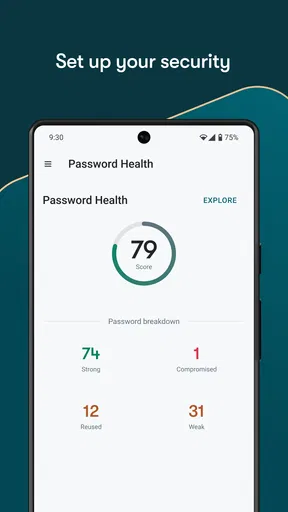
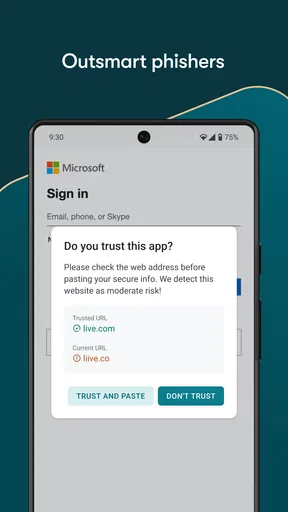
Security is where Dashlane truly shines. With end-to-end encryption, your data is only accessible to you. Not even Dashlane can see your information, which is reassuring in a world where privacy is a growing concern. The app also offers a Security Dashboard that evaluates your passwords and alerts you to any vulnerabilities.
For those who want an extra layer of security, Dashlane provides two-factor authentication. It’s a bit of a hassle to set up, but trust me, the peace of mind is worth it. Plus, if you opt for the Premium version, you get Dark Web Monitoring, which alerts you if your information is compromised.
The Security Dashboard is most useful to me as a prioritization tool, not as a reason to chase a perfect score. If it points out a password worth changing, I would start with email and financial accounts because access to those can affect many other services. Then I would work through less critical logins over time. A long checklist can feel discouraging if I treat every warning as equally urgent, so a sensible order matters.
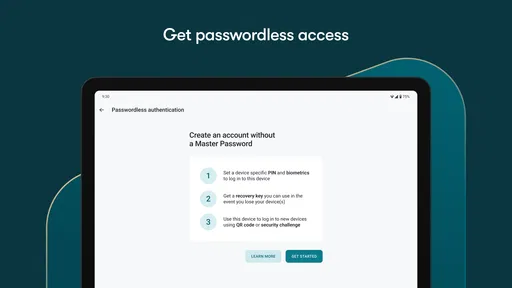
Passkeys are another part of the app’s scope, alongside passwords and personal information. They can reduce the need to type a password for services that support them, but they do not remove the value of keeping older logins organized. In practice, I would expect to use both: passkeys where a service offers a smooth option, and saved passwords for accounts that still rely on them. That mixed approach is more realistic than expecting every website to change at once.
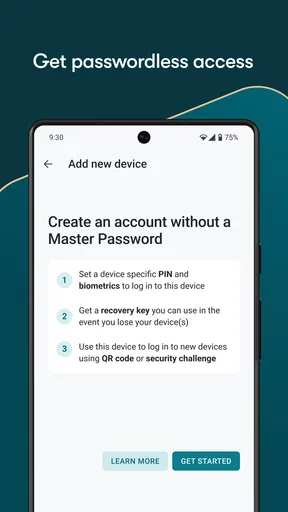
It is also worth thinking through what happens when a device changes or a sign-in becomes difficult. Keeping your master password memorable to you but hard for someone else to guess is central to the experience; making it so complicated that you cannot reliably enter it creates its own problem. I would take time to understand the account recovery and device setup steps before relying on any password manager for every important login. That is sensible preparation, not a reason to keep using the same password everywhere.
Subscription Plans
Speaking of Premium, while Dashlane offers a free version, the paid plans unlock a suite of additional features. The Premium plan includes VPN for secure browsing, unlimited device sync, and priority support. If you’re managing sensitive data, this might be worth the investment.
There’s also a Family plan, which allows you to share the app with up to five other people. It’s perfect for families or small teams who want to keep their information secure without breaking the bank.
Dashlane is free to download, with in-app purchases ranging from $3.49 to $194.99 per item, so I would check the options shown in the app and compare them with what I actually need before paying. The central question is whether the extras solve a recurring problem for me. If I mainly want a place to manage logins, I would first see how the free experience fits my routine; if I need the specific paid benefits described above, a subscription may make more sense.
Compared with saving passwords in a browser, a dedicated manager can be a better fit when I want a separate place for credentials and personal information, or when I regularly switch between devices and browsers. Browser storage may be enough for someone who stays within one browser and wants the simplest possible setup. A notes app is even more manual: it can hold a password, but it does not provide the same purpose-built sign-in flow. The right choice depends less on features in a checklist than on where you actually log in.
Dashlane’s long-term value also depends on how much you dislike maintaining scattered credentials. If your accounts are few and you already use a reliable password workflow, another app may add more upkeep than benefit. If you share household services, frequently create accounts, or find yourself resetting passwords because you cannot remember them, having a consistent vault can save effort in small, repeated moments. That is the kind of value I would judge over a normal month, rather than by the excitement of installation day.
Keeping the routine manageable
Password managers still ask for a little maintenance. I would review saved entries when I change a password, remove accounts I no longer use when it is convenient, and make sure new logins are saved as they are created. This does not need to become a weekly project. A few deliberate moments during ordinary account changes are easier to sustain than a large cleanup that keeps getting postponed.
The main source of fatigue is friction when the app does not match the way a particular login works, or when I am unsure whether a credential is stored in Dashlane or somewhere else. That is why I would avoid keeping duplicate copies in several places. If auto-fill fails for one service, manually finding the saved entry is a reasonable fallback; if it becomes a repeated issue, I would check the login details and sign-in method rather than repeatedly creating new entries.
The app is rated for Everyone, has an average rating of 4.5 from around 238,000 ratings, and has been installed over 5 million times. Those figures suggest that it has found a broad audience, but they do not decide whether it suits my own habits. The current version is 6.2607.1, and it requires Android 10 or later. I would check that requirement before planning to move an older Android device into my password routine.
Final Thoughts
Overall, Dashlane Password Manager is a robust solution for anyone tired of wrestling with passwords. It’s packed with features designed to enhance your online security and make your life easier. Sure, the Premium version comes at a cost, but the peace of mind it provides is invaluable.
Whether you’re a tech newbie or a savvy digital native, Dashlane is worth considering. It’s more than just a password manager; it’s a tool that brings simplicity and security to your digital life. So, if you find yourself drowning in passwords, give Dashlane a try. You might just find it’s the app you never knew you needed.
My lasting verdict is that Dashlane makes the strongest case when I use it as a steady routine: save new logins as they appear, rely on auto-fill when it is convenient, and review security warnings without turning them into a source of stress. Its combination of password storage, passkeys, and personal information gives it room to support more than one kind of sign-in, while the extra subscription features will matter more to some people than others.
I would skip it if I have very few accounts, strongly prefer keeping everything inside one browser, or do not want the responsibility of remembering a master password and maintaining a separate vault. For someone who juggles accounts across devices, though, I think it can earn lasting space—not because it removes every bit of password maintenance, but because it makes that maintenance easier to handle in small, repeatable steps.
Verdict
Strengths of Dashlane Password Manager
- Easy-to-use interface for quick navigation.
- Secure password generation and storage.
- Cross-platform synchronization available.
- Dark web monitoring for added security.
- Comprehensive autofill functionality.
Limitations of Dashlane Password Manager
- Premium features require a subscription.
- Limited sharing options on the free plan.
- Occasional sync delays between devices.
- No offline access to passwords.
- Some users report app performance issues.
Similar Picks in This Category
View All
Google Calendar
Google LLC4.6

Google Drive
Google LLC4.3

Google Assistant
Google LLC3.9

Microsoft OneDrive
Microsoft Corporation4.6

Samsung Calendar
Samsung Electronics Co., Ltd.4.1

Microsoft OneNote: Save Notes
Microsoft Corporation4.6
Frequently Asked Questions
Is Dashlane Password Manager secure to use?
Dashlane implements robust security measures, including AES-256 encryption, to protect your data. Your master password is never stored on Dashlane's servers, ensuring that only you have access to your information. Additionally, it offers two-factor authentication for added security, making it a reliable choice for safeguarding your passwords.
Can I use Dashlane Password Manager on multiple devices?
Yes, Dashlane supports multi-device synchronization, allowing you to access your passwords across all your devices. You can use it on your smartphone, tablet, and computer, ensuring that your information is always at your fingertips, no matter where you are.
Does Dashlane offer a free version?
Dashlane offers a free version with basic features, including password storage for up to 50 passwords on a single device. For enhanced features like unlimited password storage and dark web monitoring, you may consider upgrading to a premium plan.
How does Dashlane's autofill feature work?
Dashlane's autofill feature automatically fills in your login credentials on websites and apps, saving you time and effort. It detects login fields and populates them with your saved information securely, ensuring that you can log in with just a click or tap.
What happens if I forget my Dashlane master password?
If you forget your master password, you won't be able to access your stored data, as Dashlane does not store or know your master password. However, you can reset your account, but this will erase your stored data. It's crucial to remember or securely store your master password.
